
Independent Seniors everyday tools · Health Record
Your medication and vital signs tracker, in large print
Set it up once. Then each week starts with one button.
Your medicines, vital signs, doctors and emergency details in one large-print record.
- Tick each dose as you take it, and see at a glance what’s overdue today
- No paper forms to write out each week
- Print a copy for the fridge whenever you like. Everything stays on your own device
Free for 30 days, then from $2 a month or $9.99 a year
Kept on your device · No tracking, ever · Large print · Works offline once activated
See it in use
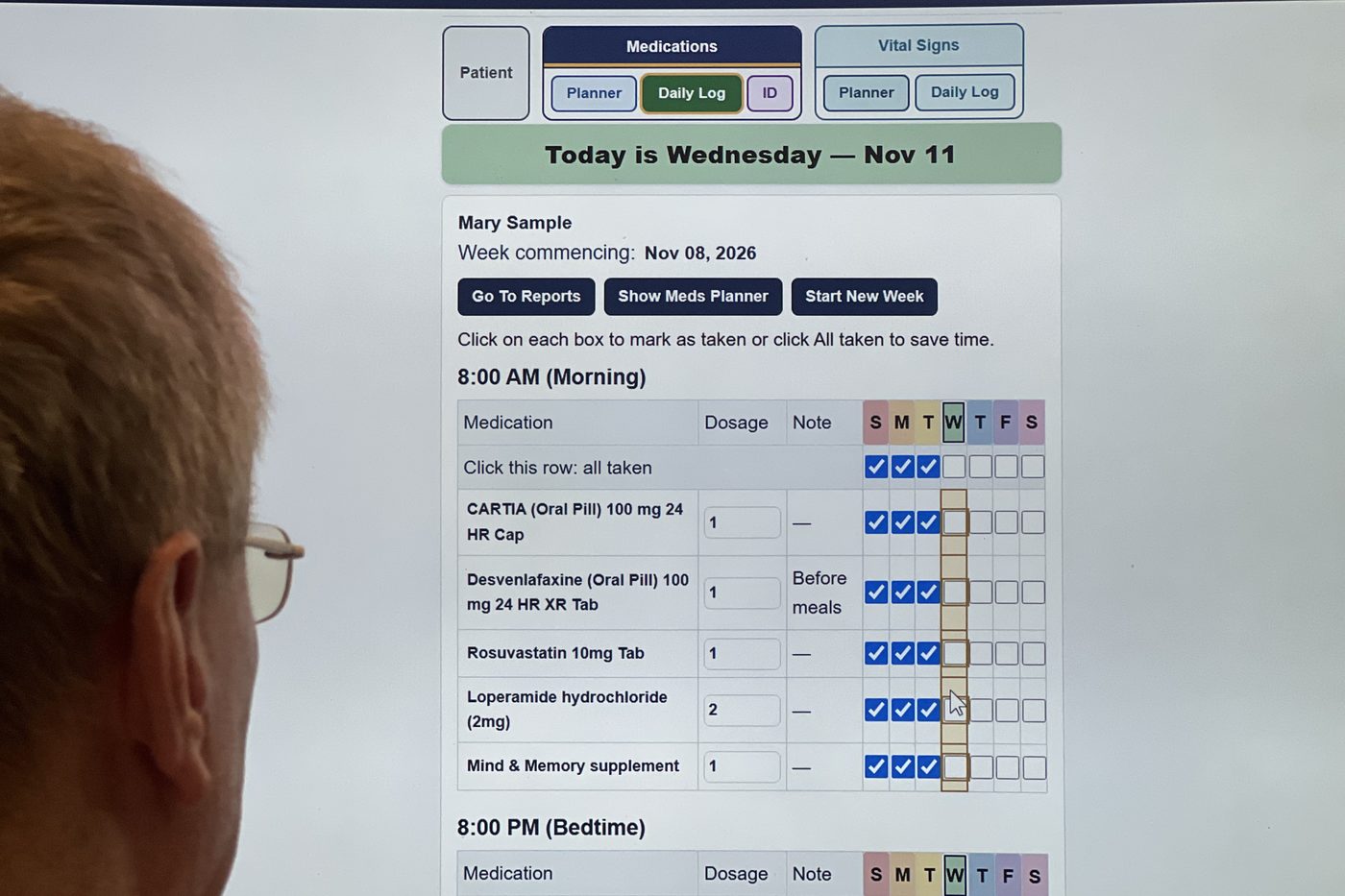
Ed Chivers, who made the Health Record, ticking off the morning medicines in the Daily Log. Each dose is one tick, and today’s column stands out, so the next dose is easy to find.
Benefits: easier than paper, every single week
The Health Record does the writing out for you, so your week is spent ticking, not copying.
Set up once
Type each medicine, its times and doses once, or have your carer do it for you. Everything carries forward, week after week.
A new week is one button
Press Start New Week, then OK. The ticks clear, the date moves on and the finished week is saved. Nothing to fill in, nothing to copy out.
Overdue doses stand out
Any dose whose time has passed without a tick turns amber, so a missed tablet is noticed the same day, while there’s still time to ask your pharmacist or doctor what to do.
A color for each day
Each day of the week has its own color, chosen to match your pill box. Today’s color shows in a banner at the top of the page, on the day’s column and on the printed log, so it’s easy to take from the right compartment and harder to make a mistake.
Tell your pills apart
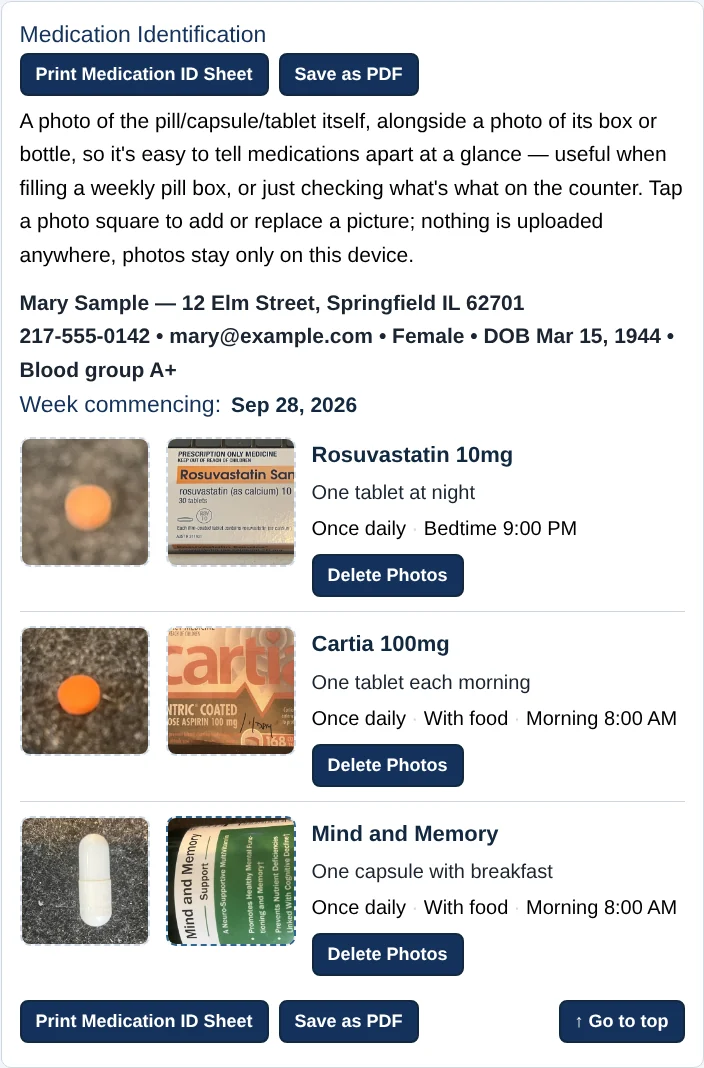
A photo of each pill beside its box makes filling your pill box quicker and more accurate.
One plan, every copy agrees
The fridge sheet, the pill-box sheet and your doctor’s copy all print from the same plan, so there’s no copying by hand and no copies that disagree.
On screen or on paper
Use it on your computer, tablet or phone, or print your plan, this week’s log and your readings sheet for the fridge door.
Your carer kept in the loop
Once a week, one locked Carer Report of your doses, readings and notes, sent from your own email.
Ready in an emergency
WHO TO CALL IN EMERGENCY is on every page, even after a license ends. Print an Emergency Sheet and a Wallet Card.
Speak instead of typing
Tap the microphone beside a medicine, your details or a note and say it, on devices that support dictation.
Also in the Health Record, ready to print
- Your ICE Wallet Card. A credit-card-sized card to fold and carry, with your name, blood type, allergies, main conditions and who to call In Case of Emergency.
- Your Emergency Sheet. One page for the fridge door or a hospital bag: conditions and treatments, medicines, allergies, implants and devices, advance directives, emergency contacts, your doctor and preferred hospital.
- Notes for your next doctor’s or carer’s visit. Jot down how you’re feeling, side effects and questions as they happen, under Notes for Doctor or Notes for Carer, then print the last two weeks to take with you.
Three parts, one record
Choose the parts you need. Your details and emergency information come with every edition.
-
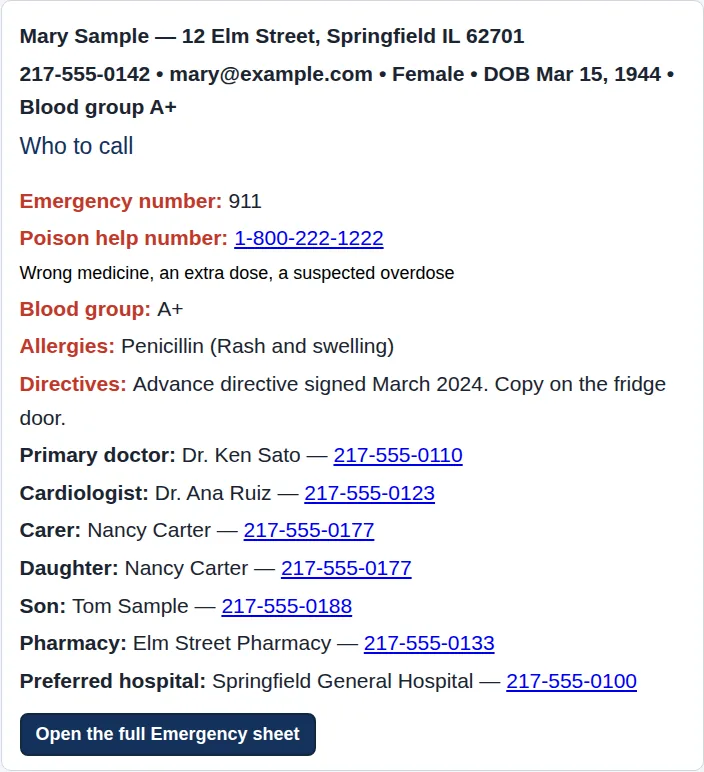
Who to call: one press, on every page. (Fictional example.) Your details and emergency information
You, your carer, your doctors and pharmacy, your health history, and the two red buttons on every page: WHO TO CALL IN EMERGENCY and EMERGENCY MEDICAL INFO.
-
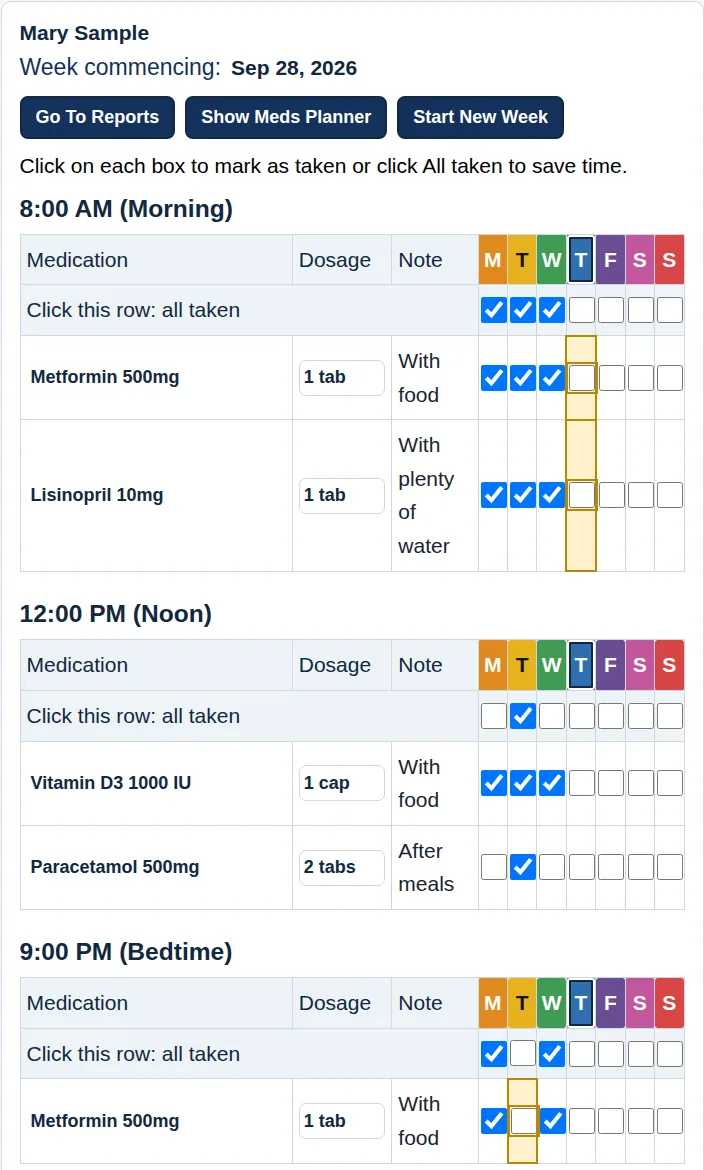
The Daily Log: amber shows what’s overdue. (Fictional example.) Medications
Medicines, vitamins and supplements, set up once. Fill your pill box from photos, tick each dose, see what’s overdue today, and print your plan for the fridge.
-
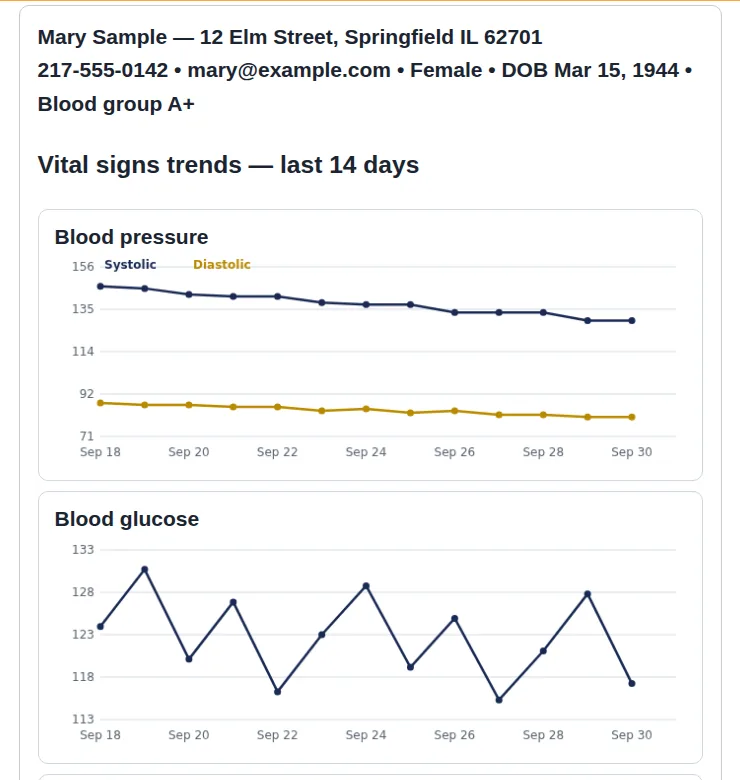
Trend charts for the last 14 days. (Fictional example.) Vital signs
Blood pressure, glucose, weight and other checks, planned once with your doctor’s instructions. Record each reading as it’s due, and see the trend.
Your week, in five steps
Set up once. After that, each day takes a minute or two.
Set up once
Your details, your medicines and your checks. Or your carer sets it all up and sends it to you to open with one press.
Fill your pill box
Match each pill to its photo, and each compartment to its day’s color.
Each day, tick and record
Tick each dose as you take it and record any reading that’s due. Today’s column is outlined; anything overdue is amber.
Write a note when something happens
How you’re feeling, a side effect, a question for your doctor. The date and time are added for you.
End of the week: two presses
Carer Report if you have a carer, then Start New Week. The finished week is saved as your WEEKLY BACKUP.
Where is my information kept?
- Saved as you go.
Your entries are kept automatically in the browser you use, on your device. Nothing you type leaves your device unless you send it.
- Backups you keep.
Press Backup to save a copy in your Downloads folder. Each Start New Week also saves a WEEKLY BACKUP of the finished week.
- Locked with your passkey phrase.
Every file that leaves your device is locked with a phrase only you know. We never see it and can’t reset it.
- Online once.
You need the internet to activate the first time. After that, everyday use works offline.
No tracking, ever. Our tools contain no advertising code and no software that could report what you type. To manage their performance and costs, we count page visits with Cloudflare Web Analytics, which sets no cookies and collects none of your records, your name or your email address. We never receive your health information, so it can’t be lost, sold or shown to advertisers.
What devices does it work on?
The Health Record runs in your web browser, so there’s nothing to install from an app store. Use an up-to-date browser such as Chrome, Edge, Safari or Firefox.
- Windows PCs and laptops
- Mac computers and laptops
- iPhone and iPad
- Samsung and other Android phones and tablets
The free printable companions work the same way, in the same browsers. Your records stay in the browser on the device you use, and you can move them to another device whenever you like, for example to a tablet before a trip.
Added to your Toolkit, opened with one click
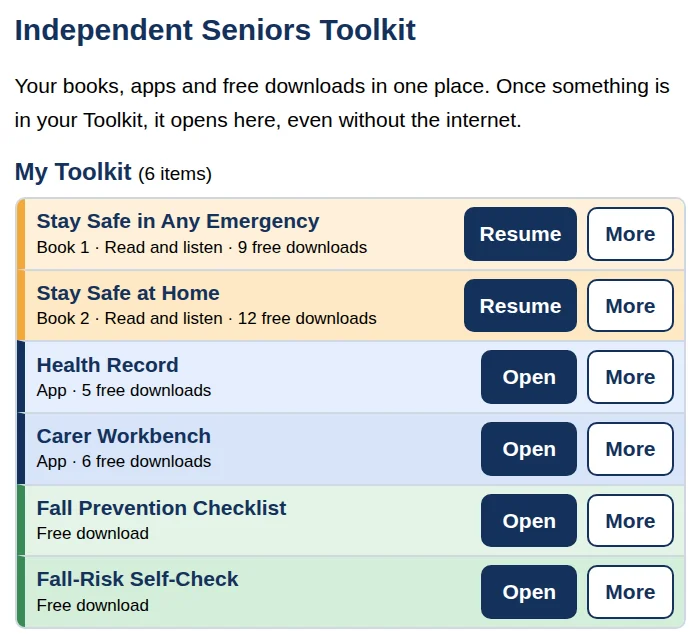
The Health Record is added to your free Independent Seniors Toolkit from its Everyday tools list. Activate it once with the email address and code from your purchase email; from then on it opens from your Toolkit with one click, also without the internet, and your Toolkit backup carries its records to a new device.
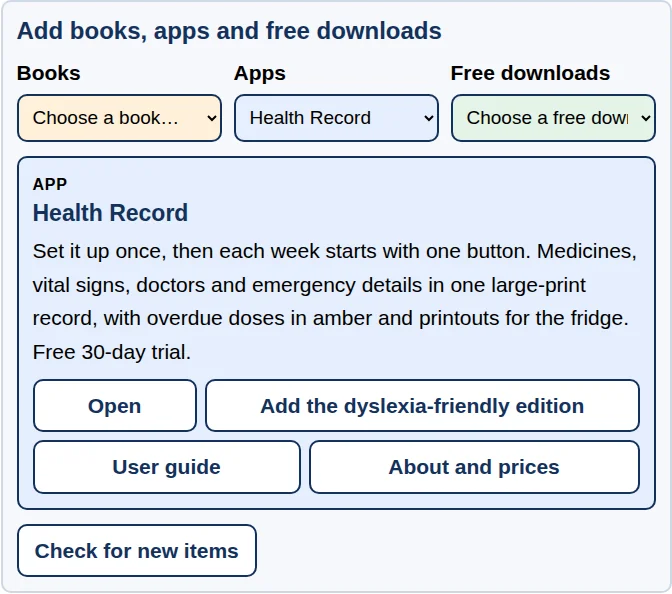
Standard view or dyslexia-friendly view: your choice
Every license includes both. They are the same tool, with the same pages and buttons; only the lettering changes. Choose the one you find easier to read.
-
Standard view
Medications: Daily Log
Click on each box to mark as taken or click All taken to save time.
Large, plain lettering (Arial), in black on white.
-
Dyslexia-friendly view
Medications: Daily Log
Click on each box to mark as taken or click All taken to save time.
Set in OpenDyslexic, with weighted letter bottoms and extra space between letters and lines.
Planned, not available yet
What we’re planning next
These are extensions we plan to add to the Health Record. They are not available yet, we haven’t set dates, and plans can change. Anything new will be described here only once it is ready.
- A daily care page. Quick taps for meals and drinks (all, some or none), personal care (alone, with help, or the carer did it), the bathroom and a simple score for the day, summed up in the weekly report.
- Appointments and refills. Questions to ask, what the doctor said and the follow-up actions, plus when each medicine runs out and when it was ordered, shown on the Carer Report.
- All About Me. A personal profile to print for a respite carer, a new aide or a hospital stay.
- More things to track. Energy, appetite, fluids and bowel movements alongside the vital signs, with their trends over time.
- A body map. Mark a bruise, sore or red patch on a front and back outline, with the date, and see whether it is getting better.
Until then, the carer printables that come with the Carer Workbench cover the same ground, on screen or on paper. Your records would stay on your own device, as they do now.
Free with every license: 7 printable companions
Interactive checklists and guides to fill in on screen, save and print, listed as they are in your Toolkit. The first 4 come with your Health Record license; those below the line are free for everyone. Each comes in a standard and a dyslexia-friendly edition.
- Family Emergency Contact Tree. Your family’s plan for an emergency: an out-of-area contact, who calls whom, and an agreed check-in message, ready to print and share.
- Emergency Kit Checklist. What to gather before an emergency, and what to do when one comes.
- Appointment Notes. Questions to ask before a doctor’s visit, notes on what was said, and the follow-up afterwards.
- Going Into Hospital Checklist. What to pack, what to ask while you’re there, and how to plan a safe return home.
Also free for everyone
- Fall Prevention Checklist. Simple changes that lower the risk of a fall.
- Fall-Risk Self-Check. A quick check of the most common fall risks, at home and in your daily routine.
- First Aid Guide. Plain-English first steps for common emergencies at home.
Try it free for 30 days
Your free trial includes everything, so you can try every part before you choose. Then pick the edition that fits, by the month or the year.
Medications
$2 a month
or $9.99 a year
Plan your medicines, vitamins and supplements, fill your pill box from photos, tick each dose and print your plan for the fridge.
Vital Signs
$2 a month
or $9.99 a year
Plan your checks, such as blood pressure, glucose and weight, record each reading, and print trend charts and your monitoring plan.
Medications & Vital Signs
$3 a month
or $14.99 a year
Everything in both, in one record. One Carer Report covers your doses, readings and notes. Best value.
A family license, for your family members. Up to 3 family members in each installation (one web browser on one device), each with their own separate record. For more, use the same code in another browser or on another of your devices: for example, 6 family members on one computer, 3 in Chrome and 3 in Edge. Every edition includes your details, Who to call, your health history, Emergency Medical Info with the Emergency Sheet and Wallet Card, backups, the dyslexia-friendly view and the step-by-step User Guide (opens in a new tab). Plus 7 free printable companions, listed below.
Comes with every license
- Family Emergency Contact Tree
- Emergency Kit Checklist
- Appointment Notes
- Going Into Hospital Checklist
Also free for everyone
- Fall Prevention Checklist
- Fall-Risk Self-Check
- First Aid Guide
Each comes in a standard and a dyslexia-friendly edition. What each one is.
Prices in US dollars. Any tax is shown at checkout before you pay. Licenses never renew by themselves: the tool reminds you before yours ends, and its Buy a new subscription button brings you to our product page and pricing. Paid licenses bought directly from us have the same 30-day money-back guarantee as our books: see our Refund Policy.
Clear about what it is
It does
- Keep your medicine plan, daily doses, readings and notes in one large-print record
- Show today’s overdue doses in amber, on screen
- Print plans, weekly logs, readings, trend charts, history reports, an Emergency Sheet and a Wallet Card
- Save automatically in your browser, and save backup files when you ask
- Prepare a locked weekly report for your carer, if you have one
It does not
- Sound alarms or send reminders: you open it and look (tip: set a daily alarm on your phone for each dose time)
- Check medicines against each other, or suggest doses
- Diagnose, rate your health, or tell you what to do about a reading
- Connect to your doctor, pharmacy, hospital or insurer
- Replace advice from your doctor, nurse or pharmacist
Questions people ask
Which edition should I choose?
Try everything free for 30 days first. If you only take medicines, choose Medications. If you only need to check readings such as blood pressure, choose Vital Signs. If you do both, Medications & Vital Signs keeps them in one record and one weekly Carer Report, for a dollar more a month.
Can my carer set it up for me?
Yes. The Carer Workbench includes a carer version of the Health Record. Your carer enters your medicines and details on their own computer and sends you a locked copy. You save the attachment and press Restore; it’s ready to use.
Is my information sent anywhere?
No. Your record stays in your browser on your device. The only things that leave it are files you choose to send, locked with your passkey phrase, and the letters you type in the medicine-name box, which are matched against the U.S. National Library of Medicine’s public list while you are online. See our Privacy Policy.
Is my information safe? What security does it use?
Your record stays on your own device. We never receive it, so there is no company database holding your health details to be hacked or sold. Once you set your passkey phrase, every file the Health Record saves or sends (backups, weekly files, Carer Reports and copies for another device) is locked with it, using published security standards built into your web browser: AES-256-GCM encryption (the U.S. Advanced Encryption Standard, NIST FIPS 197), with the key made from your phrase by PBKDF2-SHA-256 at 600,000 rounds (NIST SP 800-132, at the strength OWASP recommends). Without the phrase a locked file can’t be read, and we can’t unlock it either. Activation codes are checked with a digital signature, our tools and this site load only over a secure (HTTPS) connection, and our tools contain no advertising code. The working copy in your browser is protected by your device’s own lock, so keep a password or PIN on your computer, tablet or phone. Because we hold none of your health information, there is nothing for a certification such as ISO 27001 to audit, and we don’t claim one.
Will it work without the internet?
Yes, once it’s activated. You need a connection to activate the first time on each device, and for the medicine-name suggestions and the online guides.
Can I use it on my phone or tablet?
Yes. It works in the web browser on a computer, tablet or phone. Printing is easiest from a computer.
Why do I need backups?
Because your records are kept only in the web browser on your device. We never receive them, so we can't recover them for you. If the device is lost, stolen or breaks, or the browser's data is cleared, a backup is the only way to get your records back. Backups also let you move to a new device, step back after a mistake (restore the newest backup from before it), and run your History Reports, which are built from your weekly backups. The Health Record saves its backups for you; keep at least one copy somewhere other than your device. The simplest way is to send a locked copy to your own email address once a month.
Can I use it on more than one device?
Use it on one device at a time: the one you choose as your active device. Your record is kept in that device's web browser, and these versions don't copy your changes to any other device automatically. To change devices, move your records: press Send my records to another device, which emails them to you, locked with your passkey phrase. On the new device, activate with your code, save the email's attachment and press Restore. The new device is now your active device. The copy on the old device stays exactly as it was when you moved it and is not updated, so use only the new one from then on. If you use the Toolkit, Restore my Toolkit on the new device brings your records across too.
How do backups work, and which ones do I need to keep?
There are three kinds. Each is locked with your passkey phrase once you have set one:
- Health Record backups save themselves in your Downloads folder. When you press Start New Week, the finished week is saved as a WEEKLY BACKUP. When your medicine plan changes, an AUTO BACKUP is saved. Pressing SAVE saves a USER BACKUP. Keep your weekly backups: your History Report is built from them.
- Carer Workbench backups are not automatic. Press Save encrypted backup regularly; the Workbench shows when you last did. Its reports come from the records inside the Workbench, so you don't need backup files to run them, but a backup is your only spare copy.
- Toolkit backup: the Toolkit backs itself up whenever something changes, to the folder you choose. It carries your records from the Health Record, the Carer Workbench and the free checklists. It doesn't hold your activation codes or book codes.
Moving to a new device needs both: your Toolkit backup (or a Health Record copy sent with Send my records to another device) to bring your records, and your weekly backup files, copied into the new device's Downloads folder, to keep your history reports. Have your activation code and passkey phrase ready too.
Keep a copy somewhere other than this device, in case it is lost or breaks. The simplest way: once a month, press Send my records to another device and send it to your own email address. It arrives locked with your passkey phrase. If your Downloads folder is kept in OneDrive, iCloud or Google Drive, your weekly backups are kept off the device too.
Can my family use it?
Yes. Your license is a family license, for your family members. Up to 3 family members can each have their own separate record in each installation, meaning the tool in one web browser on one device. When it opens, the Health Record asks whose record to open, and every page shows that person’s name. For more family members, use the same activation code in another browser or on another of your devices, such as a tablet. For example, 6 family members can share one computer: 3 open the Health Record in Chrome and 3 in Edge. Each family member then always uses the same browser.
What happens when my license ends?
The tool reminds you beforehand, and its Buy a new subscription button brings you to our product page and pricing. Pay with the same email address, then enter your new code: everything picks up where it left off. After it ends, nothing is deleted: you can still print your history reports and use WHO TO CALL IN EMERGENCY, and your records stay on your device.
Is this medical advice?
No. The Health Record records what you enter and prints it. For advice about your health or medicines, talk with your doctor, pharmacist or nurse. A professional caregiver, such as a home health aide, can help you follow that advice day to day.
Our tools store what you type and print it the way you ask. They are not medical devices, not medical, legal or financial advice, and not a substitute for your doctor, pharmacist or care team. If someone needs urgent help, call your local emergency number.
Your week, in one place
Try every part of the Health Record free for 30 days.