
Independent Seniors everyday tools · Carer Workbench
Know how their week went, without phoning round
A caregiver tool for family and professional carers. The people you look after send you a weekly report from their Health Record.
- It opens and checks each report, and adds the week to their record
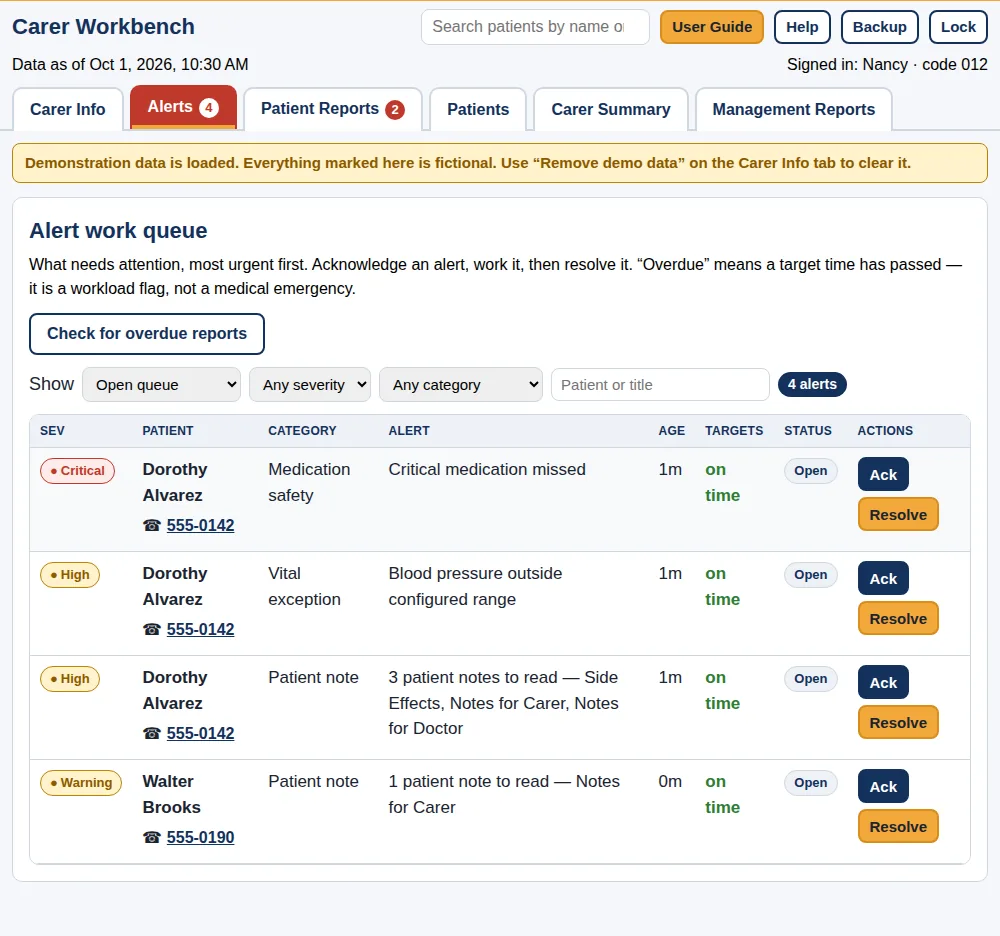
- It shows what needs attention first: a missed critical medicine, a reading outside the range you set, a note to read
- No paper charts to collect, and no accounts or logins for anyone
Your Carer Workbench purchase includes a special carer version of the Health Record.
Free for 30 days, then $3 a month or $14.99 a year
Set up their record for them · Alerts on your ranges · Originals kept · Locked on your device
See it in use
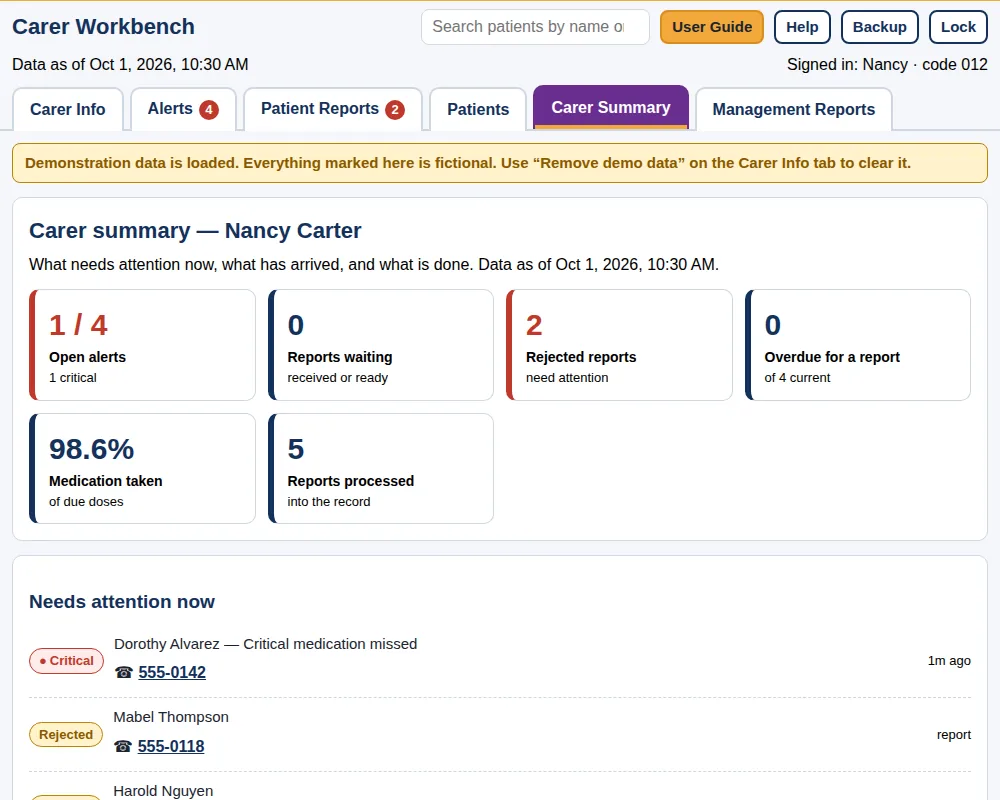
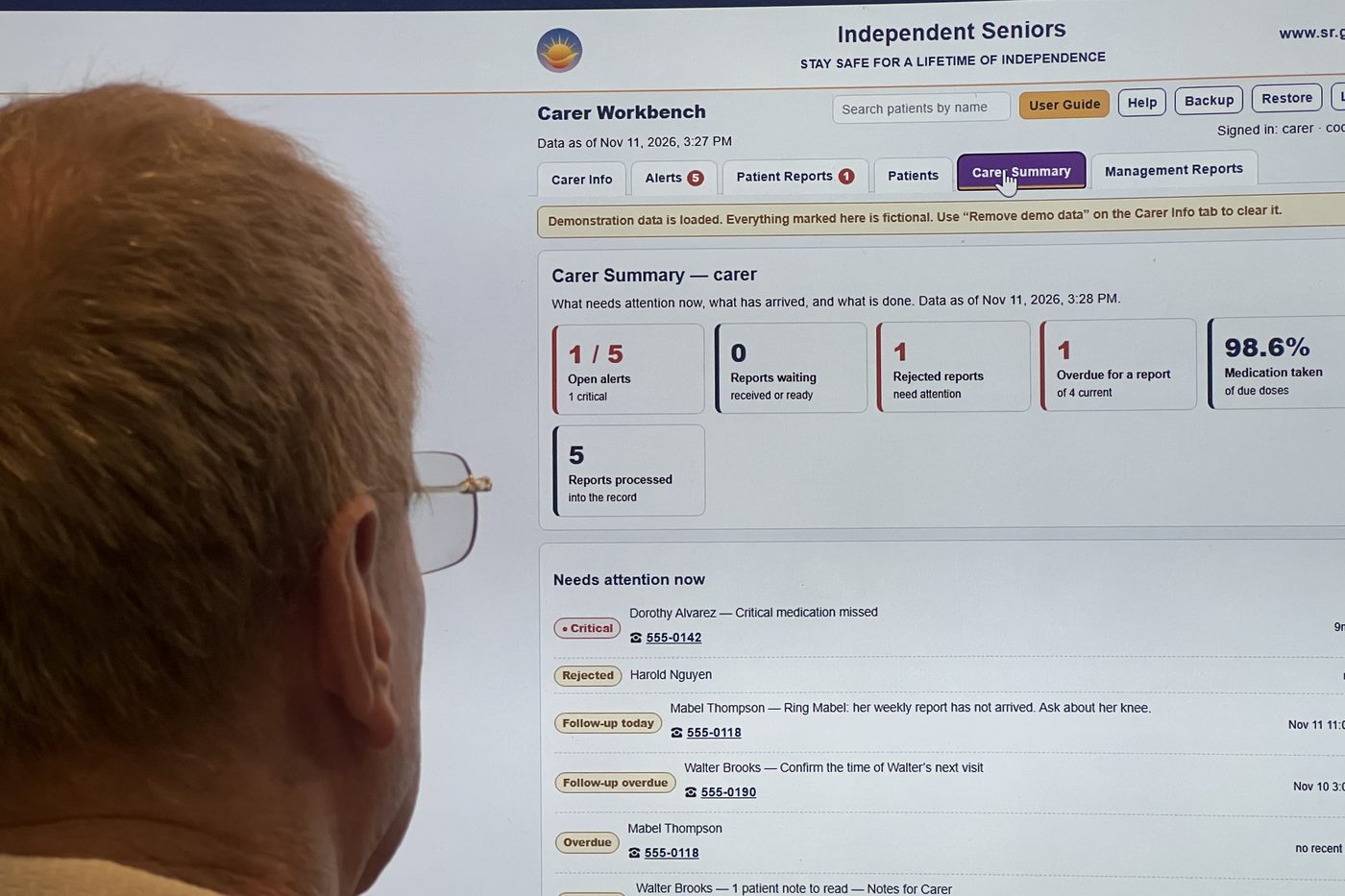
Ed working through the Carer Summary with the demo patients loaded: open alerts, overdue reports and what needs attention first, with each person’s phone number beside them.
Built for the person holding it all together
Family carers
Looking after a parent, perhaps with a brother, sister or paid carer helping. One place for their reports, and one list of what’s open.
Independent carers
Several clients, each with their own record, medicines, readings and ranges, and one queue for all of them.
Small care teams
Management reports with counts beside every rate, printable or saved as PDF, and a CSV bundle for spreadsheets.
Care at home, one week at a time
The people you look after send you a weekly report from their Health Record. The Carer Workbench opens it, checks it, and shows you what needs attention first.

Why carers use it
Less chasing, less copying, and the important things first.
Set up their record for them
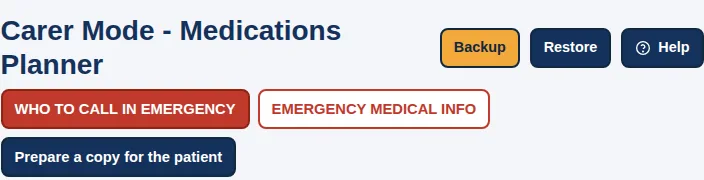
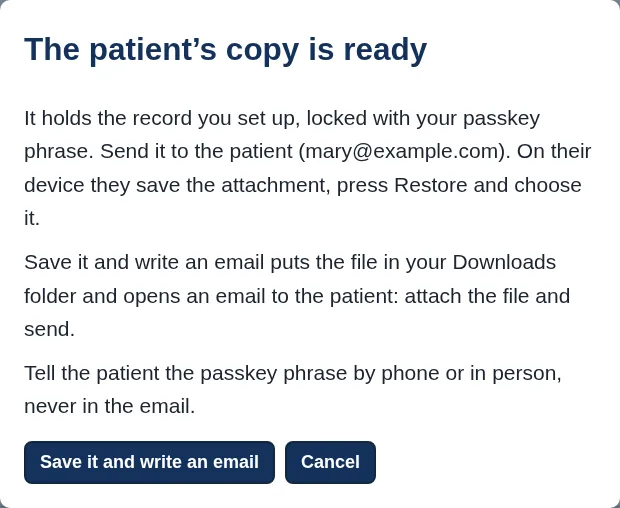
The carer version of the Health Record comes with your purchase. Enter their medicines, checks and details on your own computer and send them a locked copy to open with one press.
Their week comes to you
Each week they send one locked file from their own email. No accounts, no logins and nothing extra to install for either of you.
Missed critical medicines first
Mark the medicines that matter most for each person. A missed dose of one raises a Critical alert at the top of your queue.
Readings outside your ranges
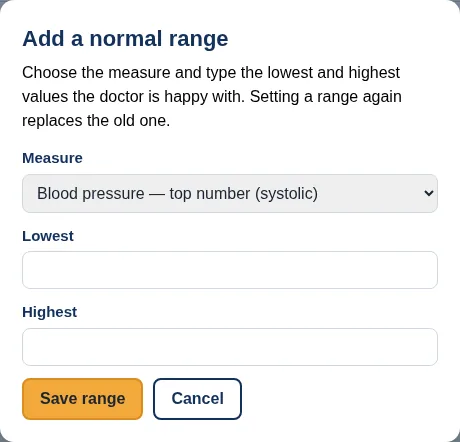
Set the range their doctor gave you, such as a blood pressure target, and readings outside it are flagged.
Every note in one place
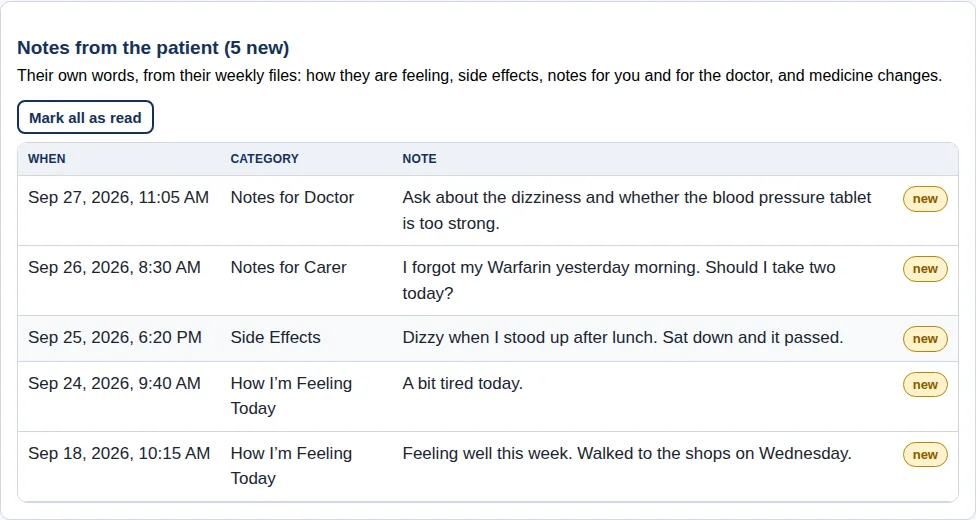
How they’re feeling, side effects, notes for you and questions for the doctor, by person and by date.
Nothing slips
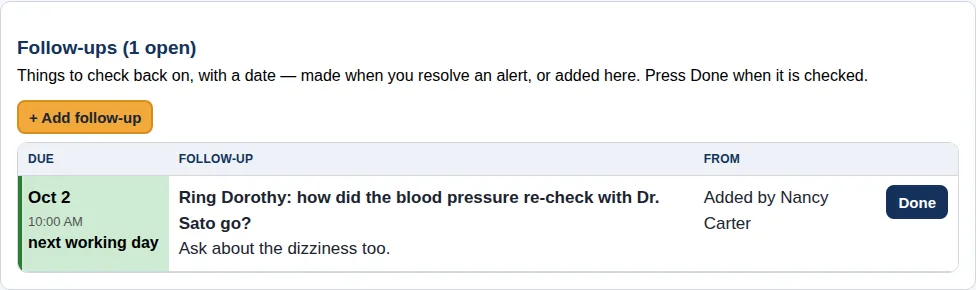
Follow-ups with due dates, and each person’s next call, visit and review, on one register.
One press per report
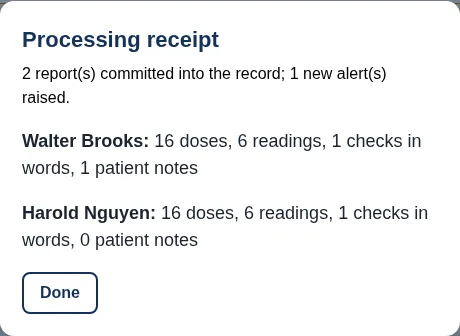
Validate, then process: the whole week goes into their record and a receipt shows what went in.
Practice first
Load demo data adds five fictional people with reports and alerts, so you can learn before your first real week.
Included with your Carer Workbench license
The carer version of the Health Record
Your license includes the Health Record Carer Edition: the full Health Record (medicines, vital signs, details and emergency information) with carer tools switched on. Every page says Carer Mode, so you always know which copy you’re in.
- Set up their record for them. Enter their details, doctors, medicines, times, doses and checks on your own computer. Press Prepare a copy for the patient: the copy is locked with your shared passkey phrase and an email to them opens. They save the attachment and press Restore, and their record is ready to tick. When a medicine changes, update it and send a new copy.
- See their full record. When they press Backup and send you the file, open it in your carer version with Restore and the phrase you share: their details, medicines, every tick, reading and note, as they see it.
- Help on a visit. On their computer, the Carer Edition and their own Health Record work on the same record, each with its own license. What you change during a visit is there for them afterwards.
- Print what’s needed. Their medication plan, the fridge sheet, the Emergency Sheet, the Wallet Card or a History Report for an appointment.
The Workbench gives you the week at a glance and the alerts. The carer version gives you the whole record, to set up, check and print.
How a week works
Reports are shared deliberately, once a week. The Workbench is not a live feed.
They record
The person you look after ticks doses, records readings and writes notes in their own Health Record, on their own device.
They send you a locked file
Their Health Record prepares a protected Carer Report (a file ending .scj) and opens an email addressed to you. They attach it and press Send. Their passkey phrase reaches you separately, in person or by phone.
You import and validate
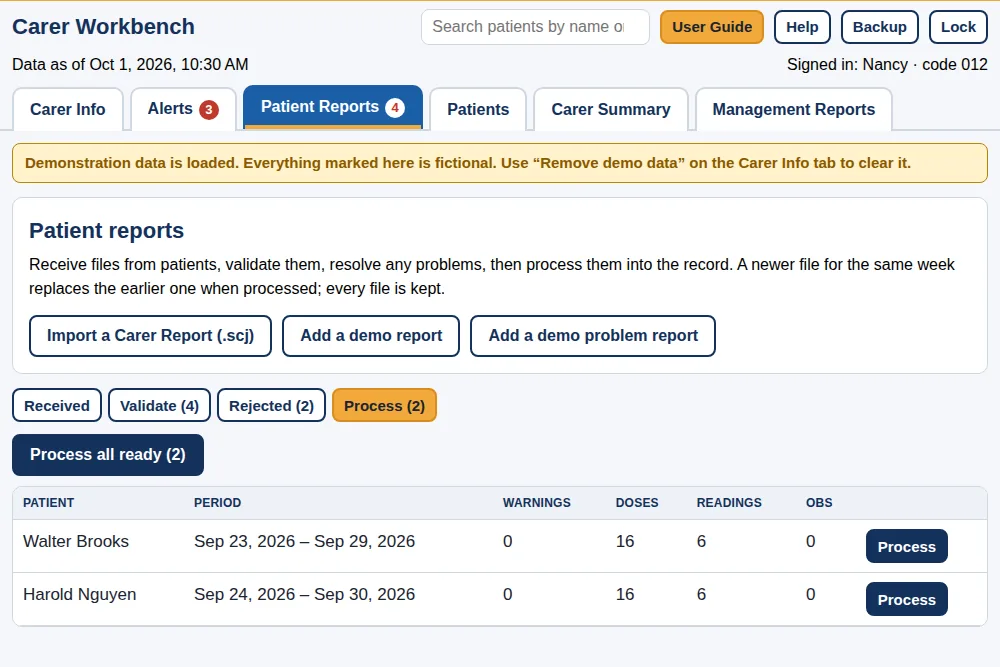
Save the attachment and import it. Validation checks it’s addressed to your carer code, matches someone on your register, and is complete. Each report becomes Ready, or Rejected with the reason and what to do.
You process it
One press adds the week to their record: every dose taken or missed, every reading and every note. A receipt shows what went in and which alerts were raised.
You work the alerts
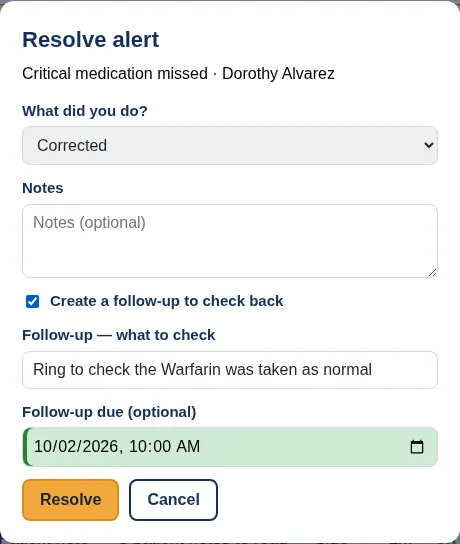
Acknowledge, follow up and resolve, most urgent first. The Carer Summary and Management Reports show where things stand.
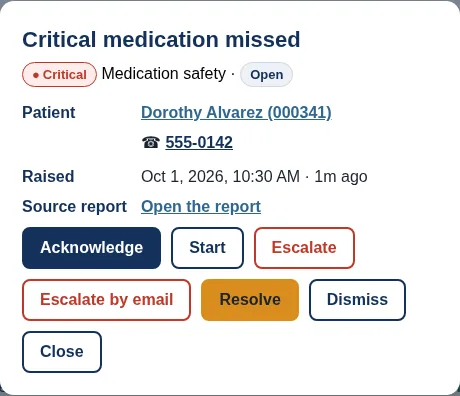
What raises an alert?
Critical medicine missed
A missed dose of a medicine you have marked Critical for that person.
Reading outside your range
A reading outside a normal range you set for that person, such as a blood pressure target their doctor gave. It means “outside the range you set”, not a diagnosis.
Notes to read
Notes they wrote that need your review: side effects, notes for you, notes for the doctor.
Overdue reports
When you press Check for overdue reports, anyone whose report hasn’t arrived is listed. The Workbench doesn’t check in the background or contact anyone for you.
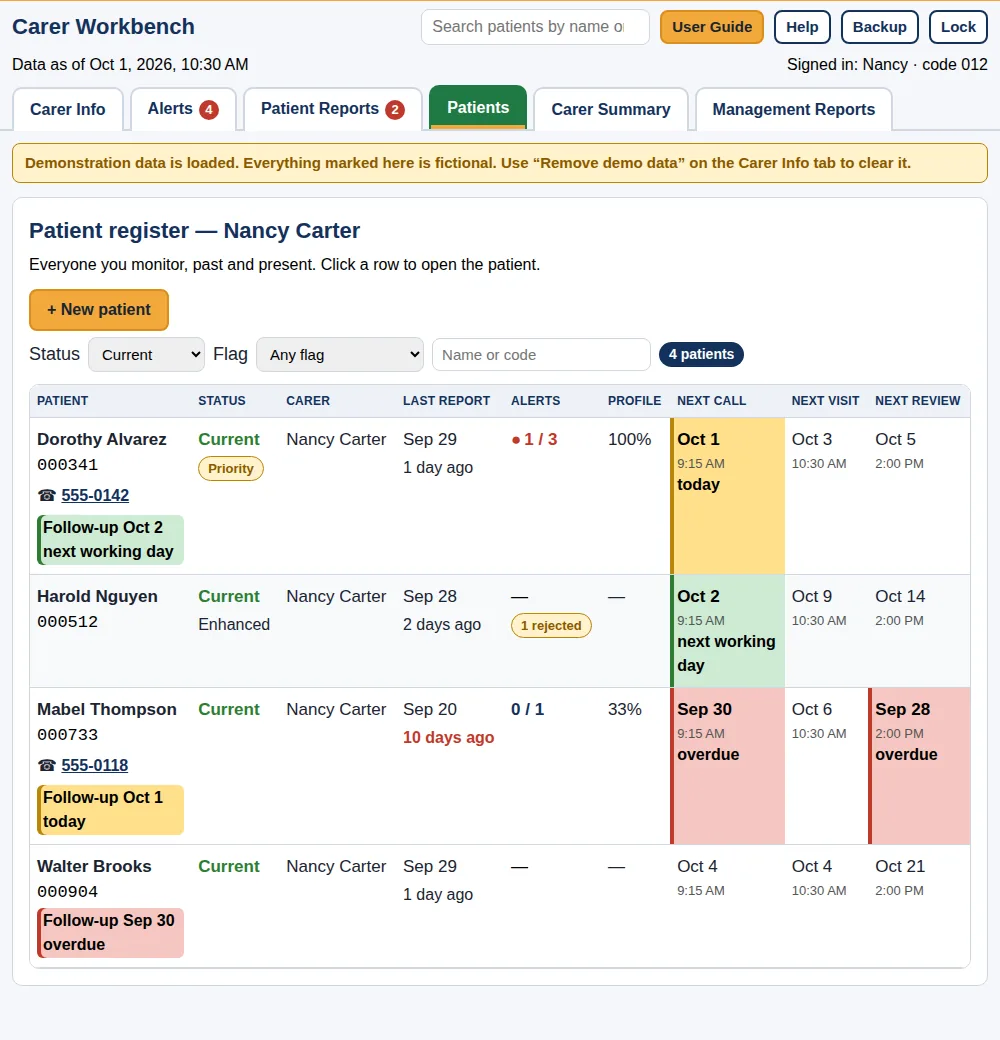
Everyone on one register
Each person’s status, last report, open alerts, follow-ups and the next call, visit and review dates, colour-coded when they’re due today or overdue.
The original is never lost
If you correct something, the Workbench records your reason and keeps the original report. If a newer report arrives for the same week, it takes over when processed, and the earlier files are kept.
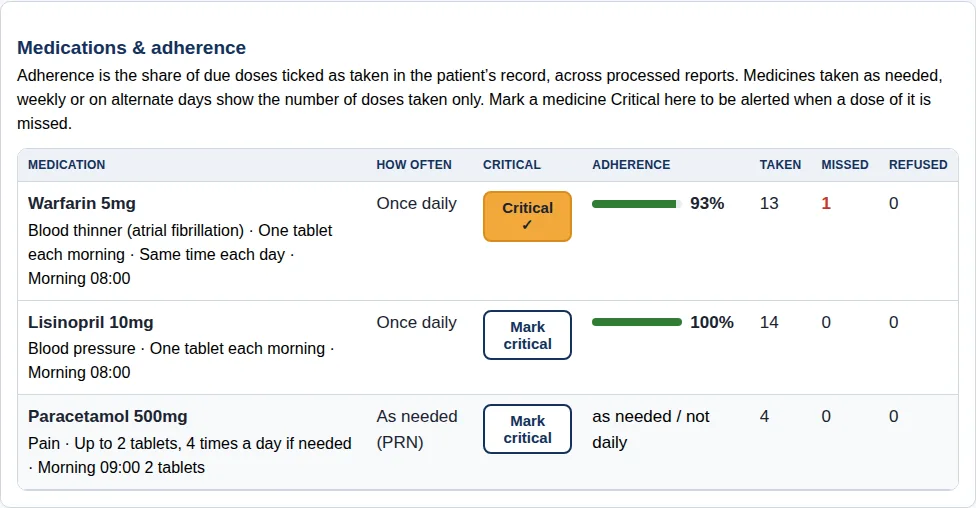
Each person has their own page: medicines, readings, notes, your observations, follow-ups and the next call, visit and review dates.
Reports you can hand on
Carer Summary shows open alerts, reports waiting, rejected reports, people overdue for a report and the medication taken rate. Click a tile to go to that list.
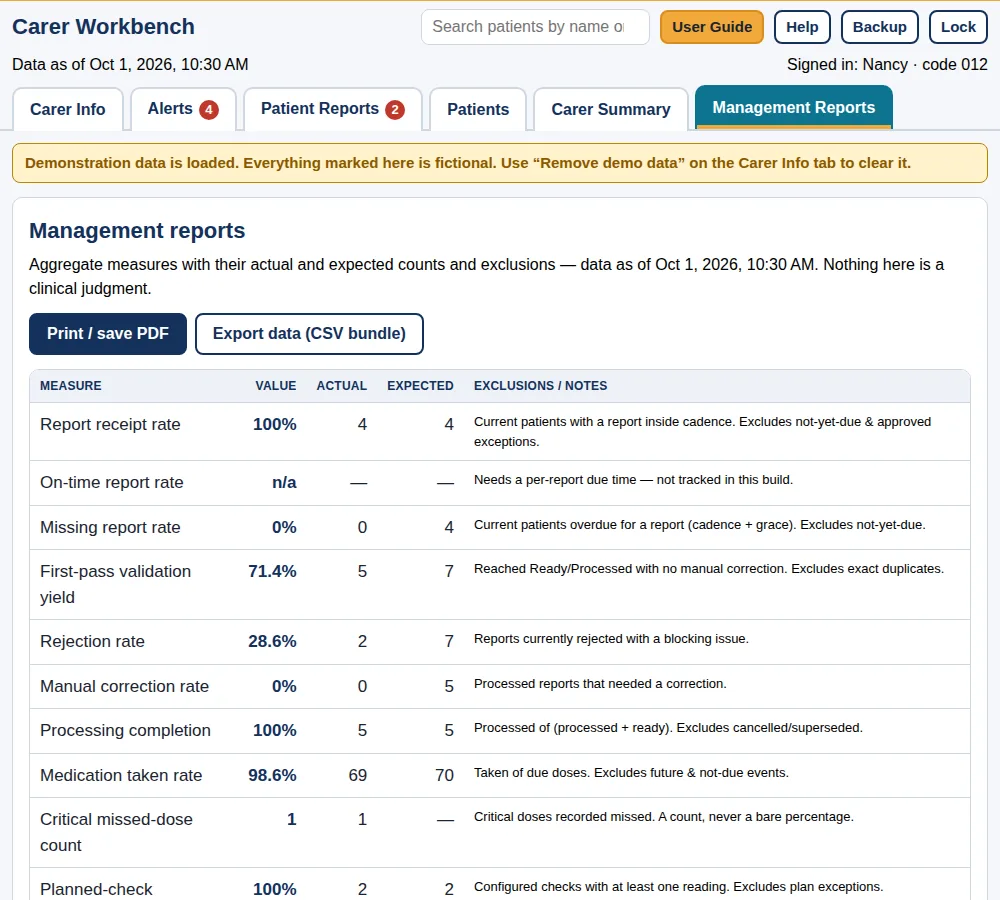
Management Reports show each measure with its actual and expected counts and what is excluded. Print or save as PDF, or export a CSV bundle for a spreadsheet.
Where is the information kept?
- Your own passkey phrase.
Everything in the Workbench on your device is locked with a phrase you choose. Nobody else can open it, including us.
- Backups you keep.
Backup saves an encrypted .cwb file to your Downloads folder. It is separate from each person’s report files.
- One device at a time.
The Workbench doesn’t sync. To move, use Send my records to another device, or restore a backup.
- Practice first.
Load demo data adds five fictional people with reports and alerts, clearly marked, so you can learn before your first real week.
No tracking, ever. Our tools contain no advertising code and no software that could report what you type. To manage their performance and costs, we count page visits with Cloudflare Web Analytics, which sets no cookies and collects none of your records, your name or your email address. We never receive your health information, so it can’t be lost, sold or shown to advertisers. We build every version to keep that promise.
What devices does it work on?
The Carer Workbench runs in your web browser, so there’s nothing to install from an app store. Use an up-to-date browser such as Chrome, Edge, Safari or Firefox.
- Windows PCs and laptops
- Mac computers and laptops
- iPhone and iPad
- Samsung and other Android phones and tablets
The free printable companions work the same way, in the same browsers. Your records stay in the browser on the device you use, and you can move them to another device whenever you like, for example to a tablet before a trip.
Added to your Toolkit, opened with one click
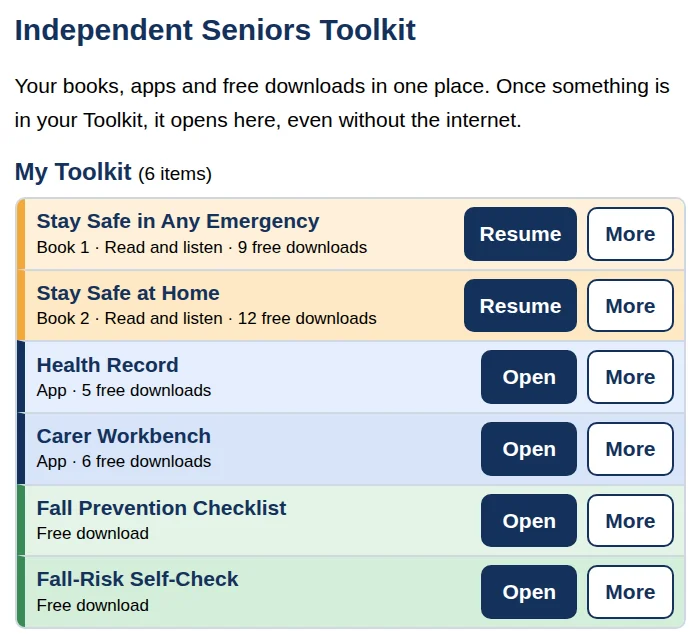
The Carer Workbench is added to your free Independent Seniors Toolkit from its Everyday tools list. Activate it once with the email address and code from your purchase email; from then on it opens from your Toolkit with one click, also without the internet, and your Toolkit backup carries its records to a new device.
Clear about what it is
It does
- Import, validate and process weekly Carer Reports from the Health Record
- Keep a register of the people you look after, with medicines, readings, notes and follow-ups
- Raise alerts from the rules and ranges you set, and keep how each was handled
- Print or save reports as PDF, and export a CSV bundle
- Keep originals, and record your reason for every correction
It does not
- Monitor anyone in real time, or detect emergencies
- Diagnose, interpret a reading, or recommend treatment
- Contact anyone for you. “Resubmit” records a request; an email escalation opens an email for you to send
- Replace a doctor, nurse, pharmacist or emergency services
- Sync between devices or give anyone else access
Eight carer printables, included with the Carer Workbench
Forms, checklists and guides for family carers: for doctor’s visits, a hospital stay, each visit and each day, medicine refills, prescription labels and skin checks. They come with your Carer Workbench license, to fill in on screen, save and print, each in a standard and a dyslexia-friendly edition. Appointment Notes and the Going Into Hospital Checklist also come with the Health Record. You can see a preview of each one here.
Appointment Notes
Questions to ask before a doctor’s visit, notes on what was said, and the follow-up afterwards.
Going Into Hospital Checklist
What to pack, what to ask while you’re there, and how to plan a safe return home.
All About Me
A friendly introduction to the person you care for, for a new carer, a respite worker or hospital staff.
Carer Visit Record and Handover
For each visit: times, how they seemed, what you checked, concerns, and what still needs doing.
Daily Care Log
One page a day for meals, drinks, personal care, the bathroom, activities and how the day went.
Medicine Refill Tracker
When each medicine runs out, refills left, and when it was ordered and picked up.
Prescription Label Shorthand
What BID, PRN, QHS and other prescription shorthand mean, in plain words.
Body Map for Skin Checks
Mark bruises, sores or red patches on a front and back outline, and note how they change.
Planned, not available yet
What we’re planning next
These are extensions we plan to add for carers. They are not available yet, we haven’t set dates, and plans can change. Anything new will be described here only once it is ready.
- Log a visit. Record each visit in the Carer Workbench: when you arrived and left, what you checked, any concerns, the actions still to do and who you told. It would be kept with the patient’s record and shown in the Management Report.
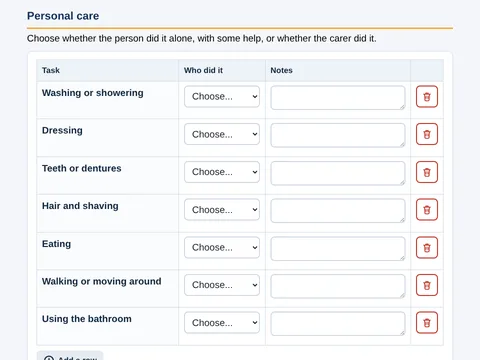
- A daily care page. In the carer version of the Health Record: quick taps for meals and drinks (all, some or none), personal care (alone, with help, or the carer did it), the bathroom and a simple score for the day, summed up in the weekly report.
- Appointments and refills. Questions to ask, what the doctor said and the follow-up actions, plus when each medicine runs out and when it was ordered, shown on the Carer Report.
- All About Me. A personal profile to print for a respite carer, a new aide or a hospital stay.
- More things to track. Energy, appetite, fluids and bowel movements alongside the vital signs, with their trends over time.
- A body map. Mark a bruise, sore or red patch on a front and back outline, with the date, and see whether it is getting better.
Until then, the carer printables that come with the Carer Workbench cover the same ground, on screen or on paper. Your records would stay on your own device, as they do now.
Free with every license: 14 printable companions
Interactive checklists and guides to fill in on screen, save and print, listed as they are in your Toolkit. The first 10 come with your Carer Workbench license; those below the line are free for everyone. Each comes in a standard and a dyslexia-friendly edition.
- Appointment Notes. Questions to ask before a doctor’s visit, notes on what was said, and the follow-up afterwards.
- Going Into Hospital Checklist. What to pack, what to ask while you’re there, and how to plan a safe return home.
- All About Me. A friendly introduction to the person you care for, for a new carer, a respite worker or hospital staff.
- Carer Visit Record and Handover. For each visit: times, how they seemed, what you checked, concerns, and what still needs doing.
- Daily Care Log. One page a day for meals, drinks, personal care, the bathroom, activities and how the day went.
- Medicine Refill Tracker. When each medicine runs out, refills left, and when it was ordered and picked up.
- Prescription Label Shorthand. What BID, PRN, QHS and other prescription shorthand mean, in plain words.
- Body Map for Skin Checks. Mark bruises, sores or red patches on a front and back outline, and note how they change.
- Family Emergency Contact Tree. Your family’s plan for an emergency: an out-of-area contact, who calls whom, and an agreed check-in message, ready to print and share.
- Emergency Kit Checklist. What to gather before an emergency, and what to do when one comes.
Also free for everyone
- Fall Prevention Checklist. Simple changes that lower the risk of a fall.
- Fall-Risk Self-Check. A quick check of the most common fall risks, at home and in your daily routine.
- ICE Wallet Card. An “in case of emergency” card to fill in, print and carry.
- First Aid Guide. Plain-English first steps for common emergencies at home.
Quick answers
Free, sourced answers for carers and families.
- How to help a parent from a distance: What you can do from afar, talking with their doctors, and finding local help.
- What to put on an emergency information sheet: One page that tells paramedics and family what they need to know.
Try it free for 30 days
Then $3 a month or $14.99 a year. Licenses never renew by themselves: the Workbench reminds you before yours ends, and its Buy a new subscription button brings you to our product page and pricing.
- The Carer Workbench, standard and dyslexia-friendly editions
- A special carer version of the Health Record
- The step-by-step User Guide (opens in a new tab) and help pages
- 14 free printable companions, listed below
Comes with every license
- Appointment Notes
- Going Into Hospital Checklist
- All About Me
- Carer Visit Record and Handover
- Daily Care Log
- Medicine Refill Tracker
- Prescription Label Shorthand
- Body Map for Skin Checks
- Family Emergency Contact Tree
- Emergency Kit Checklist
Also free for everyone
- Fall Prevention Checklist
- Fall-Risk Self-Check
- ICE Wallet Card
- First Aid Guide
Each comes in a standard and a dyslexia-friendly edition. What each one is.
Prices in US dollars. Any tax is shown at checkout before you pay. Paid licenses bought directly from us have the same 30-day money-back guarantee as our books: see our Refund Policy.
Questions people ask
Is the Carer Workbench a caregiver app?
It’s a caregiver tool that opens in the web browser on your computer, with nothing to install from an app store and no accounts for anyone. The people you look after use the Health Record; you use the Workbench to read their weekly reports and see what needs attention first.
How can I keep track of my parent’s medicines from a distance?
Your parent ticks each dose in their Health Record and, once a week, emails you a locked Carer Report. The Workbench opens it, adds the week to their record, and shows a missed critical medicine or a reading outside the range you set before anything else. Our free answer How to help a parent from a distance has more ideas.
How much does it cost?
Try it free for 30 days. Then it’s $3 a month or $14.99 a year, and it includes a carer version of the Health Record. Licenses never renew by themselves.
What does the person I look after need?
Their own Health Record on their own device, your 3-digit carer code and their 6-digit patient code typed into it, and a passkey phrase they share with you in person or by phone.
How do I know a report is meant for me?
Validation checks the carer code it was addressed to and matches the person on your register. These codes route reports; they are not proof of identity, so agree them with each person face to face.
What is the carer version of the Health Record?
The Health Record Carer Edition, included with your Workbench license. It is the full Health Record with carer tools: Prepare a copy for the patient to set up someone’s record and send it to them, and Restore to open the full record from a backup they send you. It holds one person’s record at a time in your browser, so Backup before you Restore another person’s file.
Does the person I care for see what I record?
No. Your notes, observations and follow-ups stay in your Workbench.
Will it tell me if someone is unwell?
No. It shows what was recorded and flags readings outside the ranges you set. It doesn’t diagnose, monitor or detect emergencies. If someone needs urgent help, call your local emergency number.
Why do I need backups?
Because your records are kept only in the web browser on your device. We never receive them, so we can't recover them for you. If the device is lost, stolen or breaks, or the browser's data is cleared, a backup is the only way to get your records back. Workbench backups are not automatic, so press Save encrypted backup regularly; the Workbench shows when you last did. A backup also lets you move to another computer and step back after a mistake. Keep a copy somewhere other than this computer, for example by sending it to your own email address. How backups work, and which to keep.
Can I use it on more than one computer?
One device at a time. Move it with Send my records to another device, or restore your latest backup.
What if I forget my workbench passkey phrase?
We can’t recover it, and nobody else can either. You can start a new workbench and restore a backup only if you know the phrase that locked it. Keep it somewhere safe.
Our tools store what you type and print it the way you ask. They are not medical devices, not medical, legal or financial advice, and not a substitute for your doctor, pharmacist or care team. If someone needs urgent help, call your local emergency number.
See your week at a glance
Try the Carer Workbench free for 30 days, with demo data to practice on.